Top 5 Beginner-Friendly AWS Projects That Build Real Skills
•
AWSBeginner ProjectsCloud EngineeringAWS CertificationsPortfolio Projects
Five practical AWS projects beginners can actually finish, each mapped to core cloud concepts, certification topics, and portfolio-ready experience.
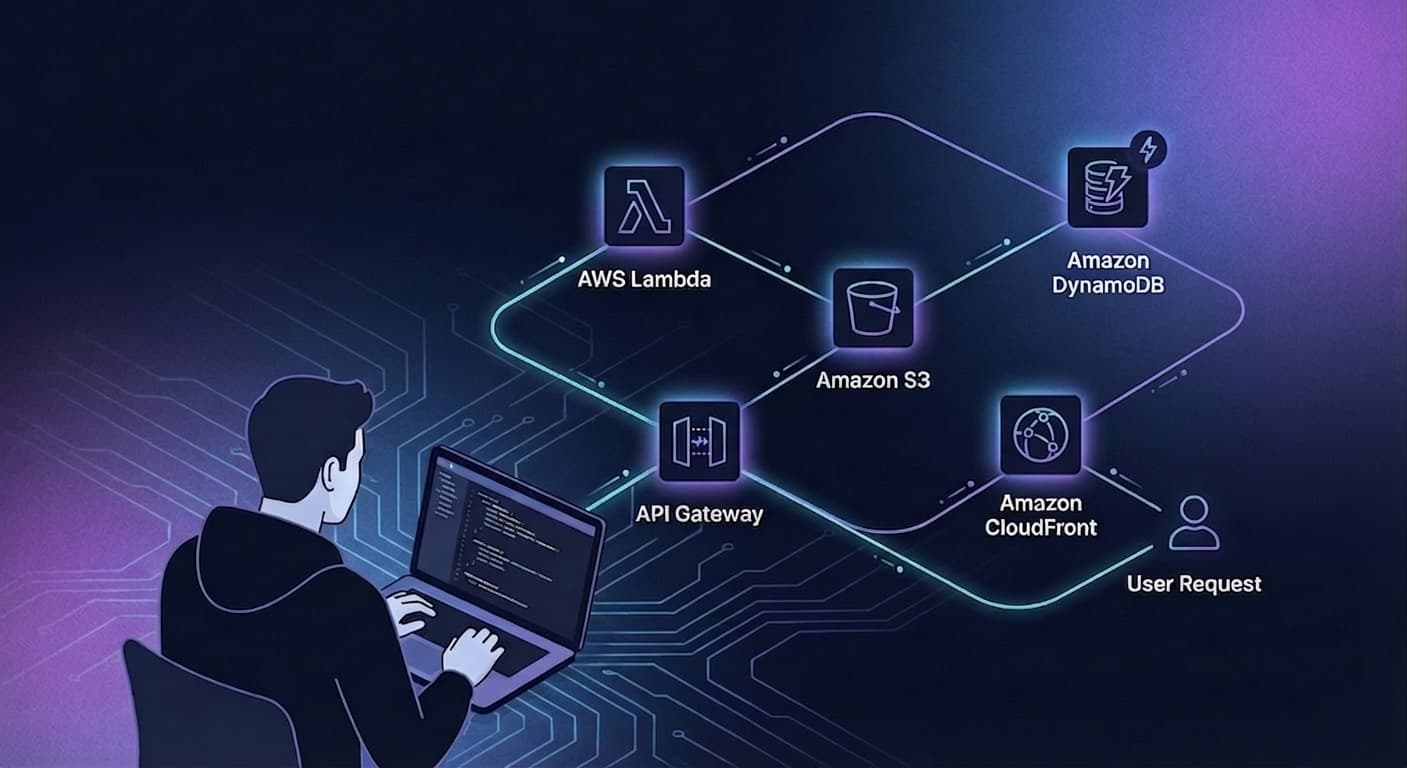
Most people studying AWS never build anything real.
They watch courses, take notes, memorize service names, and still feel stuck when it's time to actually use the platform.
That gap matters.
Because AWS starts making sense when you stop treating it like trivia and start treating it like a system.
These five projects are a good place to start.
They are beginner-friendly, practical, and broad enough to help you build the mental model that AWS certifications are supposed to teach:
- how traffic reaches an application
- how compute and storage fit together
- how event-driven systems work
- how deployment automation reduces risk
- how infrastructure becomes repeatable with code
None of these need to become giant production systems. The goal is to finish them, understand them, and use them to build judgment.
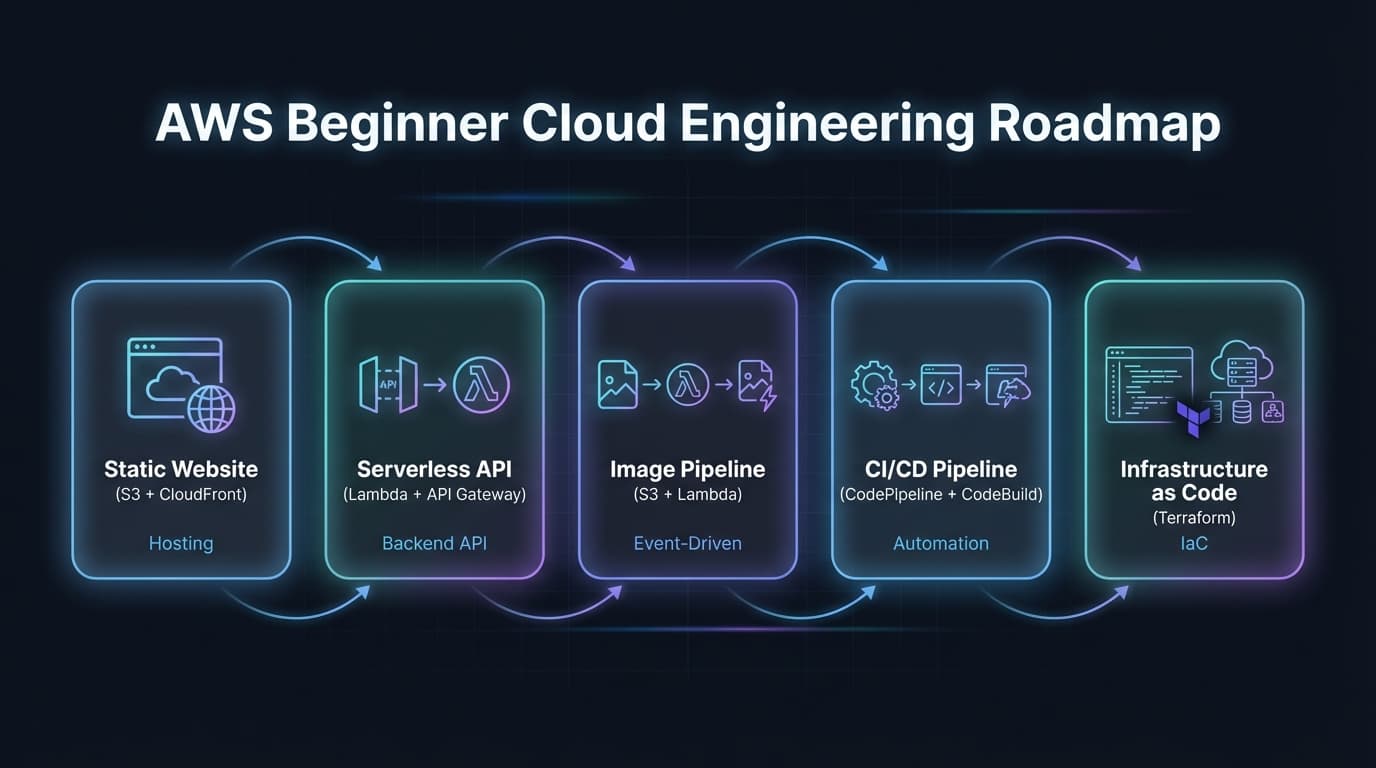 Top 5 Beginner-Friendly AWS Projects
1. Static Portfolio Website with S3, CloudFront, and Route 53
If you are brand new to AWS, start here.
This project is simple enough to finish quickly, but it still teaches several core cloud ideas in one shot.
Why it matters
You learn how a static site is stored, cached, routed, and served to real users. That sounds basic, but it covers foundational concepts that show up everywhere.
Services covered
- S3 for object storage and static content
- CloudFront for caching and global delivery
- Route 53 for DNS
- IAM for controlled access to the bucket and distribution
MVP scope
- Build a small HTML, CSS, or Next.js export portfolio site
- Upload the static files to S3
- Put CloudFront in front of it
- Connect a domain with Route 53
Make it better
- Add HTTPS with ACM
- Configure cache invalidation for updates
- Use separate dev and prod buckets
Cert relevance
This project reinforces basic networking, storage, CDN behavior, DNS, and IAM boundaries. It is one of the cleanest ways to make core AWS services feel concrete.
Architecture sketch
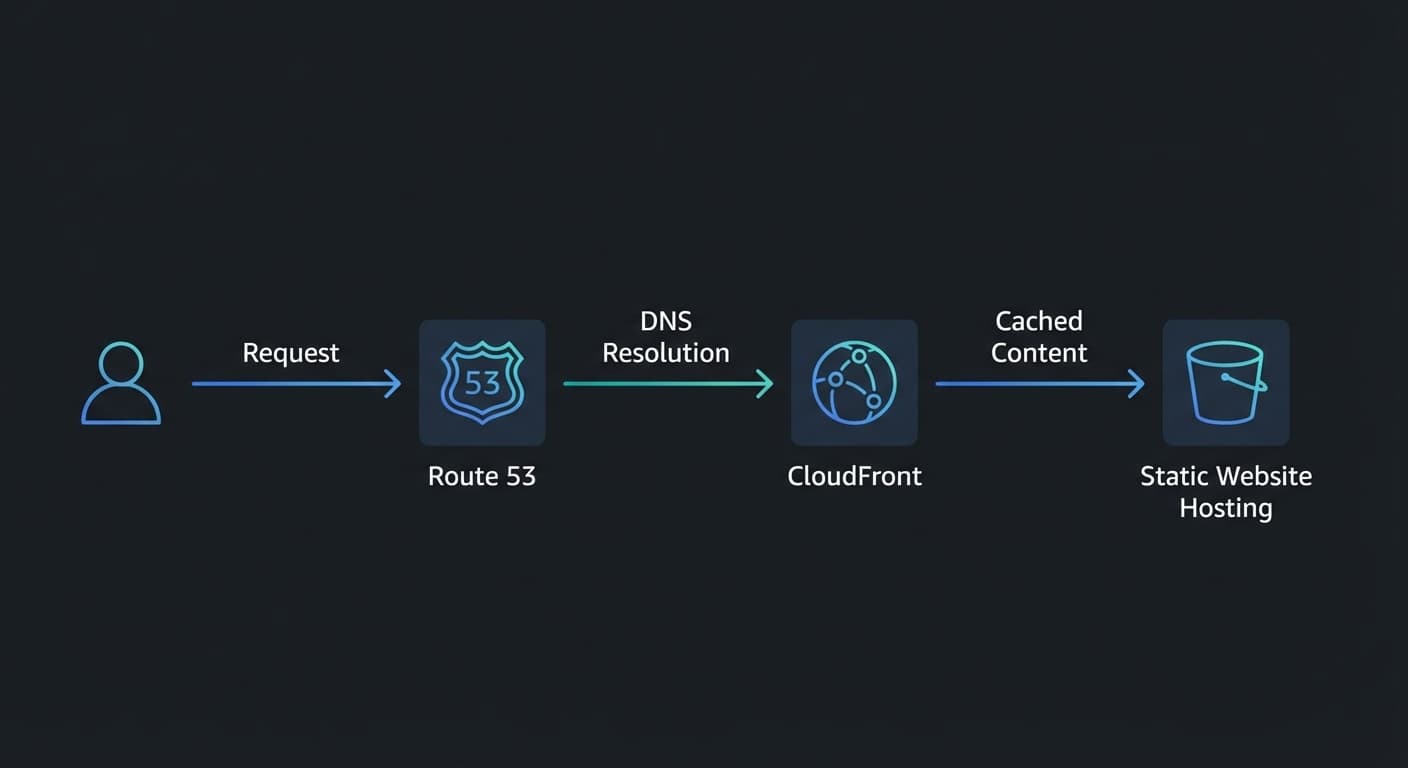
Project 1 architecture: static hosting with S3, global delivery through CloudFront, and DNS via Route 53.
2. Serverless CRUD API with Lambda, API Gateway, and DynamoDB
This is one of the best beginner projects because it teaches modern AWS application design without requiring you to manage servers.
Why it matters
You learn how requests flow into an API, how functions execute on demand, and how a backend stores data without provisioning a traditional database server.
Services covered
- API Gateway for routing and request handling
- Lambda for serverless compute
- DynamoDB for NoSQL storage
- IAM roles for secure service-to-service access
MVP scope
Build a tiny app with three endpoints:
POST /itemsto create a recordGET /itemsto list recordsDELETE /items/{id}to remove a record
Good project ideas:
- a study session tracker
- a workout log
- a simple habit tracker
Make it better
- Add request validation
- Add pagination for list results
- Add user authentication
- Add a
PUTendpoint for updates
Cert relevance
This hits services and patterns that show up constantly in AWS exam prep: serverless architecture, event invocation, IAM permissions, API behavior, and managed data services.
Architecture sketch
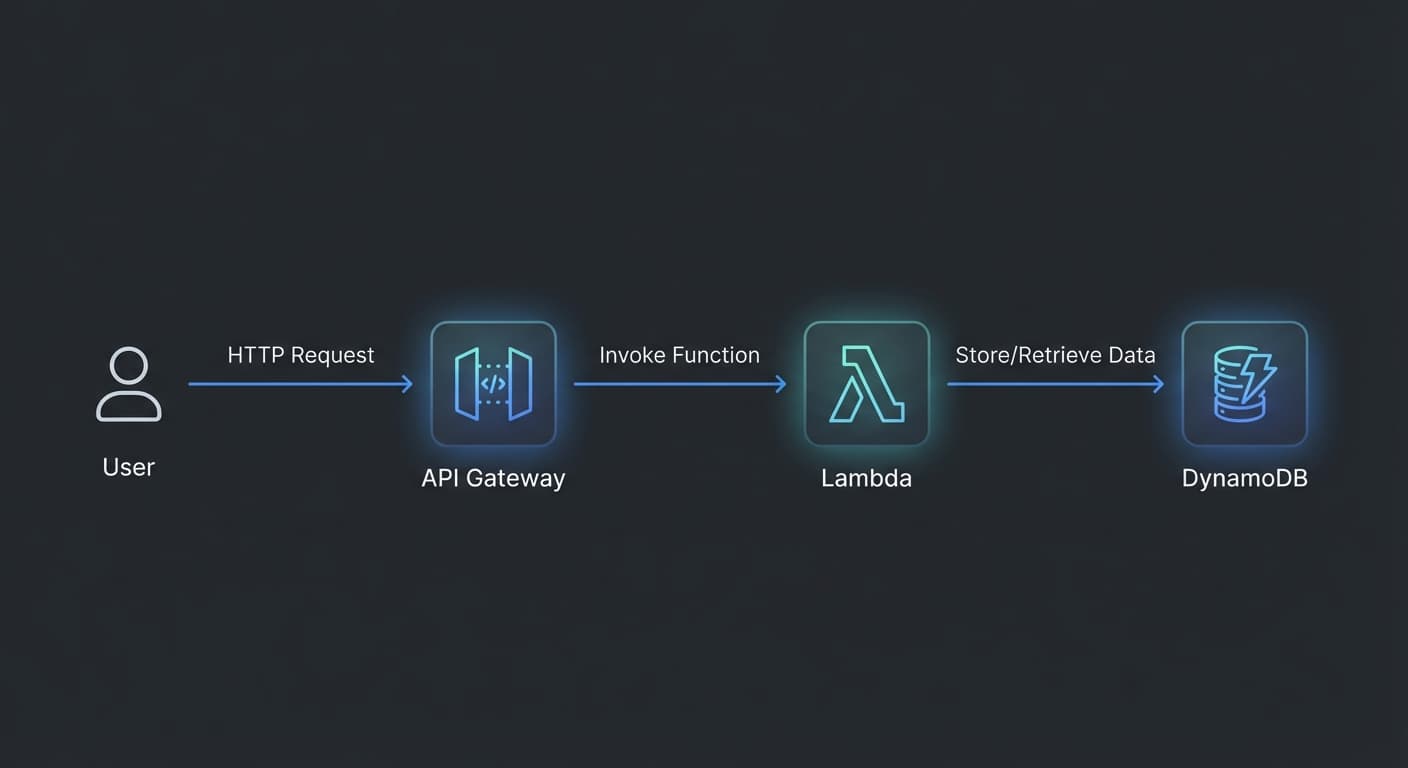
Project 2 architecture: a serverless CRUD backend with API Gateway, Lambda, and DynamoDB.
3. Image Upload and Processing Pipeline with S3 and Lambda
This is where AWS starts feeling more like a cloud platform and less like a collection of tools.
Why it matters
You stop thinking only in request-response terms and start understanding event-driven architecture.
Instead of a user calling your backend directly, an upload creates an event. That event triggers work. That work can analyze, transform, or store results somewhere else.
Services covered
- S3 for uploads
- Lambda for processing triggered by events
- DynamoDB or CloudWatch Logs for storing results
- Optionally Rekognition if you want image labeling
MVP scope
- Upload an image to S3
- Trigger a Lambda function when the object is created
- Extract file metadata or run simple analysis
- Save the result or log it somewhere visible
Make it better
- Add a frontend uploader
- Generate thumbnails
- Use Rekognition for labels or moderation
- Store processed metadata in DynamoDB
Cert relevance
This project teaches core event-driven thinking, which is a major shift for beginners. It also reinforces managed services, decoupled workflows, and async processing.
Architecture sketch
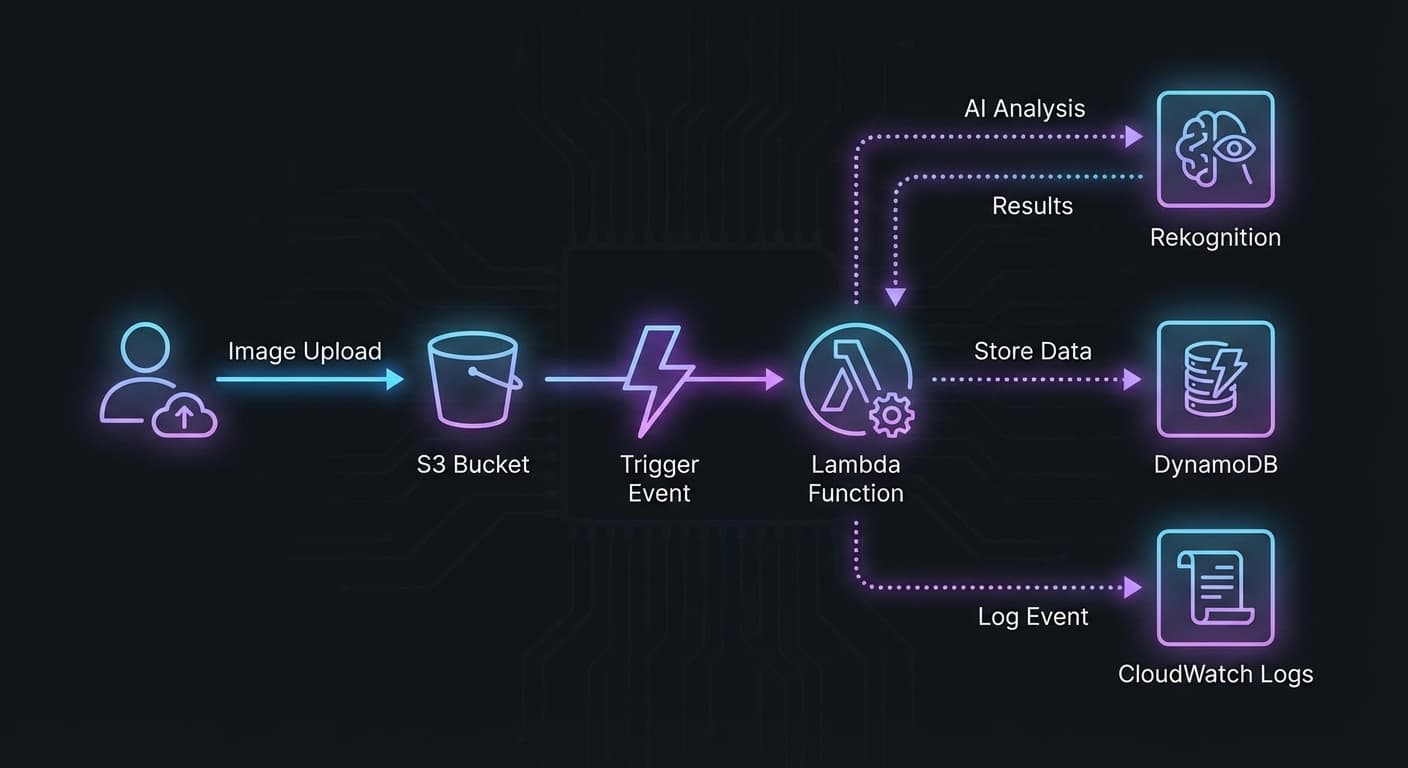
Project 3 architecture: an event-driven image pipeline triggered by S3 uploads.
4. Simple CI/CD Pipeline with CodePipeline and CodeBuild
A lot of beginners learn how to deploy once. Fewer learn how to deploy repeatedly.
That difference matters in real engineering.
Why it matters
A pipeline teaches you that cloud work is not just about running services. It is about delivering changes safely, consistently, and without relying on memory.
Services covered
- CodePipeline for orchestration
- CodeBuild for build and test steps
- S3, Lambda, or another target for deployment
- IAM for pipeline execution permissions
MVP scope
- Connect a GitHub repository
- Trigger on push
- Run a build step
- Deploy a static site or simple Lambda function automatically
Make it better
- Add a test stage
- Add a manual approval gate
- Split build and deploy into separate stages
- Send notifications on failures
Cert relevance
This project builds intuition around automation, deployment flow, permissions, and operational discipline. Those ideas show up in both certification prep and actual job expectations.
Architecture sketch
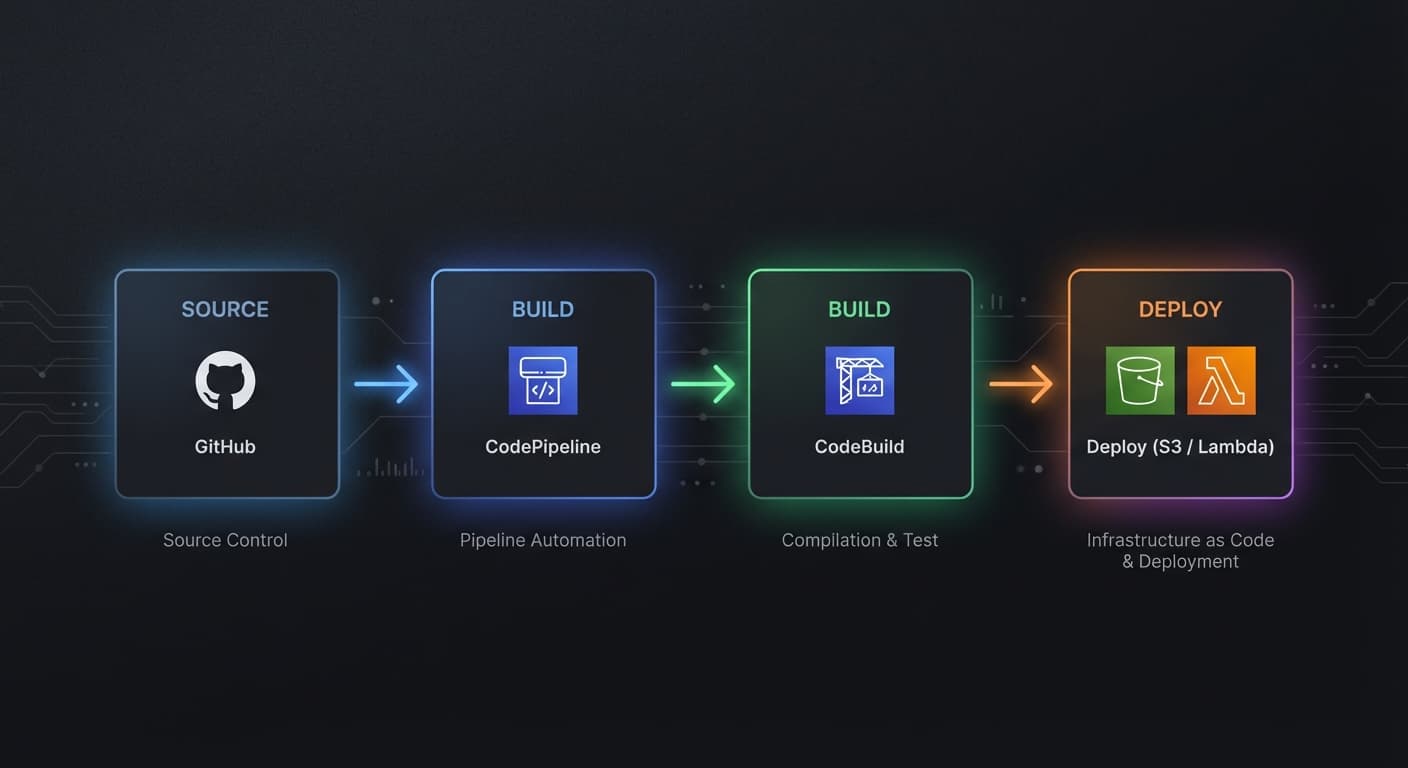
Project 4 architecture: automated build and deployment flow from source control to deployment target.
5. Rebuild One of the Projects with Terraform
This is the project that turns AWS from learning into engineering.
Why it matters
Manual setup is useful at first because it helps you explore services. But once you understand the pieces, repeating everything by hand becomes a liability.
Infrastructure as Code forces clarity:
- what exists
- how it is configured
- what depends on what
- how to recreate it safely
Services covered
- Terraform itself as the provisioning layer
- Any AWS services from one of the earlier projects
- S3 and DynamoDB for remote state if you want to go further
MVP scope
Pick Project 2 and define it in Terraform:
- Lambda
- API Gateway
- DynamoDB table
- IAM roles and permissions
Make it better
- Add staging and production environments
- Use remote state in S3
- Add locking with DynamoDB
- Break shared infrastructure into reusable modules
Cert relevance
Even if an exam does not test Terraform directly, this project strengthens your understanding of AWS architecture, dependencies, IAM, networking, and repeatable deployments.
Architecture sketch
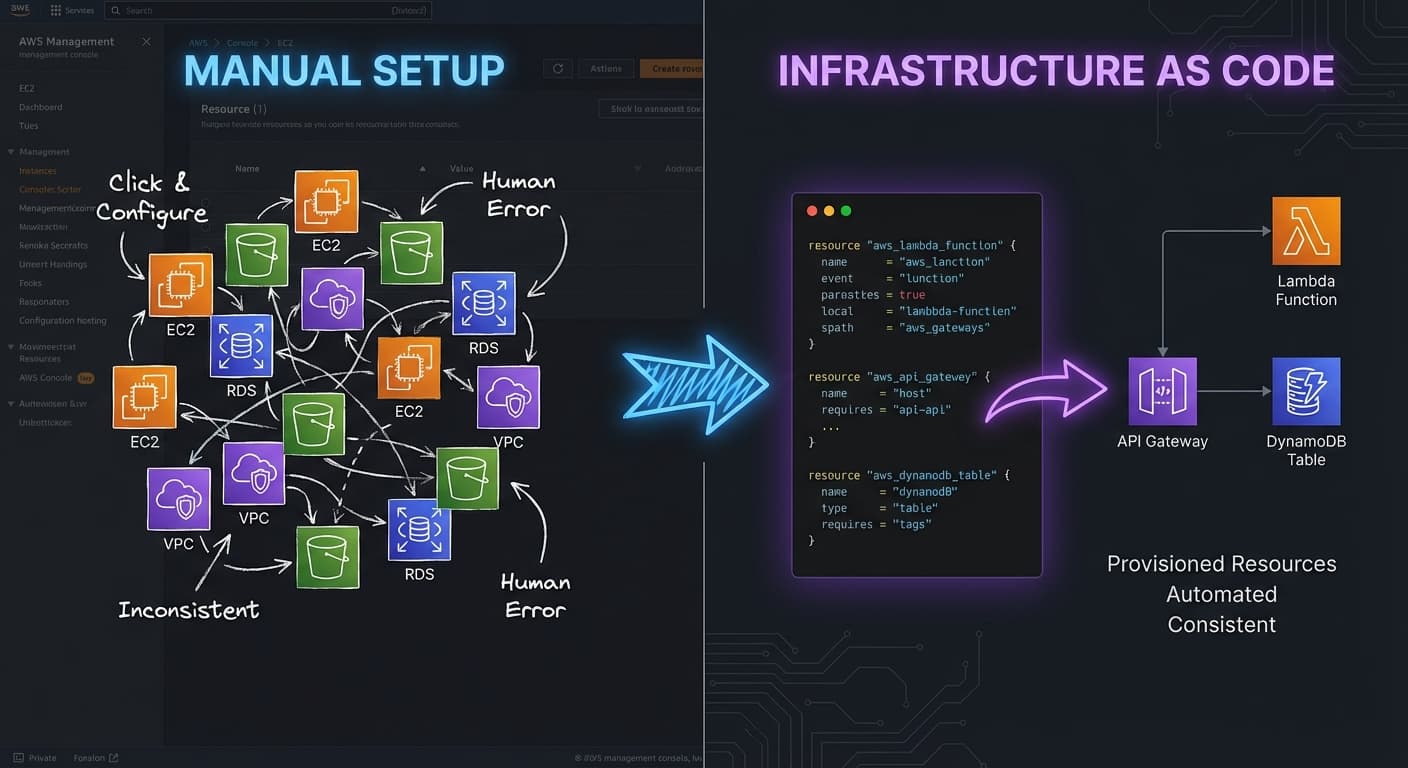
Project 5 architecture: repeatable AWS infrastructure managed through Terraform.
How to Choose the Right First Project
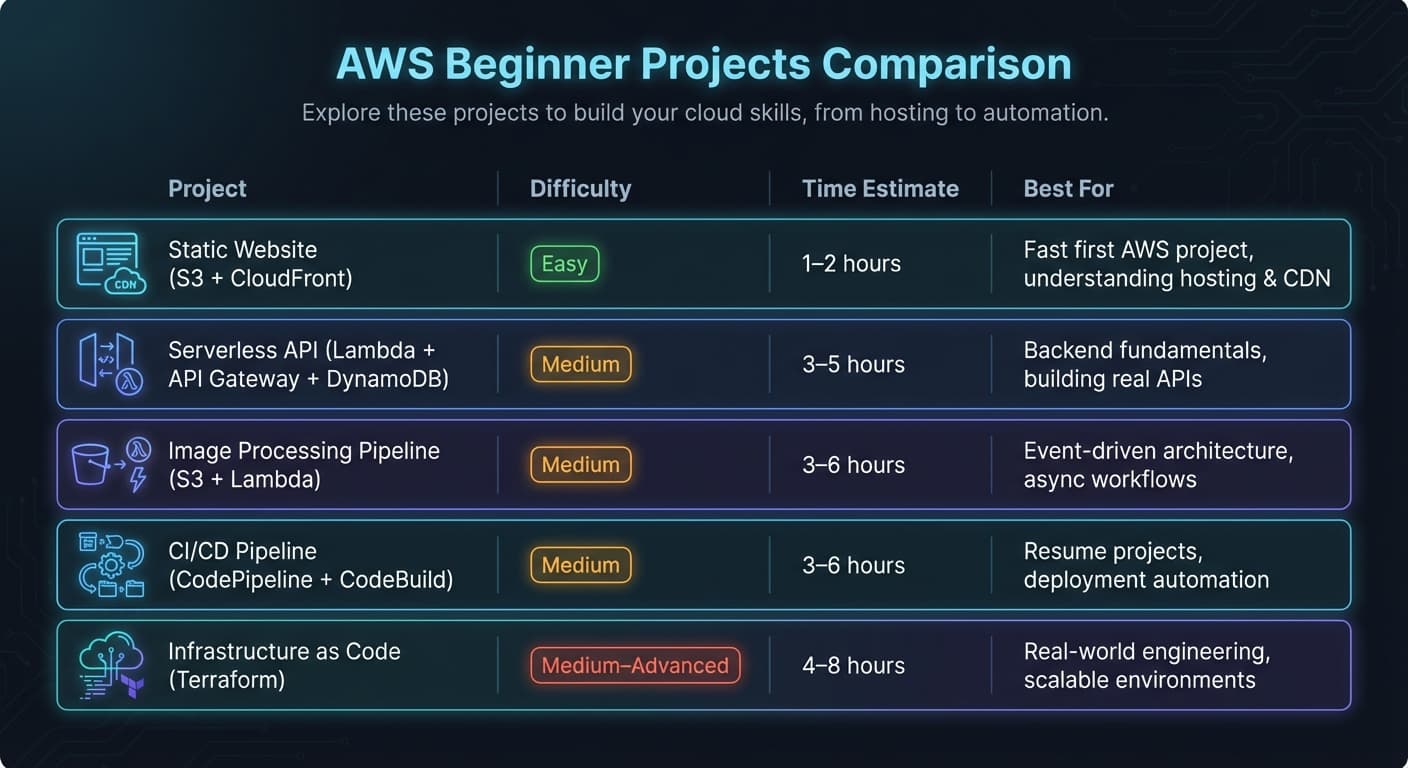
Use this chart to pick the project that best matches your current skill level and learning goal.
If you are overwhelmed, use this shortcut:
- choose the static website if you want the fastest win
- choose the serverless API if you want backend practice
- choose the image pipeline if you want event-driven experience
- choose the CI/CD pipeline if you want resume value fast
- choose Terraform if you already understand the basics and want to level up
The wrong move is not choosing the "wrong" project.
The wrong move is staying in passive study mode forever.
Why These Projects Work So Well for AWS Certification Prep
Each project maps cleanly to the services and mental models that beginners need:
| Project | Main AWS Concepts |
|---|---|
| Static site | S3, CloudFront, Route 53, IAM |
| Serverless API | Lambda, API Gateway, DynamoDB, IAM |
| Image pipeline | S3 events, Lambda, async workflows |
| CI/CD pipeline | CodePipeline, CodeBuild, deployment automation |
| Terraform rebuild | IaC, repeatability, environment design |
This is why building matters.
When you have actually wired the pieces together, exam questions stop feeling abstract.
You are no longer asking, "What does this service do?"
You are asking better questions:
- Why would I choose this service here?
- What fails if this dependency breaks?
- How do I secure this path?
- How would I deploy this again without drift?
That is the kind of understanding that lasts.
Final Thought
What actually moves you forward is simpler than most people want to admit:
- 🔨 You do not need 25 unfinished AWS projects.
- ⚒️ You need one or two finished ones that taught you something real.
- 🛠️ Start small. Keep the scope tight. Finish the build. Then improve it.
- ⚙️ That is how cloud knowledge starts turning into engineering judgment.
Build With CertForge
If you want guided practice instead of passive study, CertForge is built for exactly that.
Sign up for CertForge to sharpen your AWS fundamentals with practical certification prep, realistic questions, and learning that stays connected to how cloud systems actually work.
CertForge Beta
Join the Beta
Get early access to CertForge and practice AWS the way it is meant to be learned: with realistic questions, targeted weak-area review, and certification prep grounded in real cloud thinking.
Join the Beta
 Join the Beta
Early beta access with practical AWS-focused study flows.